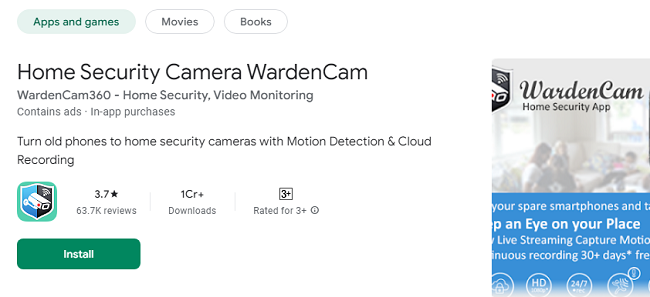
In an increasingly connected world, home security has become a top priority. WardenCam is a revolutionary app that turns your old smartphones or tablets into powerful surveillance cameras, ensuring your peace of mind while you’re away. With its simple setup, motion detection, two-way audio, and seamless cloud storage integration, WardenCam offers a cost-effective way to monitor your home, office, or loved ones anytime, anywhere.
This comprehensive guide explores the unique features, benefits, and uses of WardenCam, providing you with everything you need to know about enhancing your home security system.
Why Choose WardenCam?
WardenCam stands out as a versatile and user-friendly home security solution. It allows you to utilize spare devices that would otherwise sit idle, transforming them into effective surveillance cameras. Whether you're at work, on vacation, or just out running errands, WardenCam provides instant access to live video feeds and recorded events, ensuring you never miss a moment.
Key Benefits of WardenCam App
Affordable Security Solution
Unlike traditional security systems, WardenCam is a budget-friendly option. There’s no need to purchase expensive cameras or pay for monthly monitoring fees. Simply use your existing devices to create a robust surveillance system.
Easy Setup and Use
Setting up WardenCam is incredibly simple. Install the app on your primary phone and any spare devices, sign in with your Google account, and choose “Camera” mode for the device acting as the camera. Set your primary phone to “Viewer” mode, and you're ready to go!
Access from Anywhere
WardenCam works with WiFi, 3G, 4G, and LTE networks, allowing you to monitor your home or office from virtually anywhere. Whether you're across town or on the other side of the world, you can access live streams and recorded events with ease.
Cloud Storage Integration
Store all recorded videos securely on your personal Google Drive or Dropbox account. WardenCam never stores your data on its servers, ensuring privacy and security.
Motion Detection Alerts
Receive instant notifications when motion is detected. WardenCam’s motion detection feature can trigger an alarm to scare off intruders, providing an added layer of security.
Two-Way Audio
Communicate directly with anyone near the camera using the two-way audio feature. This is especially useful for checking in on loved ones or giving instructions to visitors.
WardenCam App Features in Detail
1. Live Video Monitoring
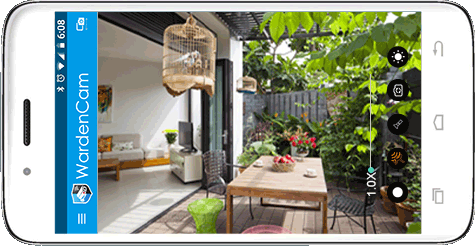
With WardenCam, you can watch live video feeds 24/7. Place your spare device in key locations around your home—such as the front door, kitchen, or garage—and monitor these areas in real-time from your phone. The app provides high-quality video streaming, ensuring you always have a clear view.
2. Motion Detection and Alerts
WardenCam’s advanced motion detection technology automatically starts recording when movement is detected. You’ll receive instant push notifications and emails alerting you to the activity. This feature is perfect for catching intruders, monitoring package deliveries, or keeping an eye on pets.
3. Cloud Storage for Recorded Videos
Never worry about losing important footage. WardenCam uploads all recorded videos directly to your Google Drive or Dropbox account, where you can access them anytime. This eliminates the need for expensive DVRs or SD cards and ensures your recordings are safe even if the camera device is stolen.
4. Two-Way Audio Communication
The app's two-way audio feature allows you to speak and listen through the camera device. This is ideal for checking in on elderly relatives, calming a pet, or warning intruders to leave.
5. Multi-Camera Support
WardenCam supports multiple cameras within the same system, making it easy to monitor several areas simultaneously. View all your cameras on one screen and switch between live feeds with a single tap.
6. Customizable Settings
Tailor the app to your specific needs with customizable settings. You can adjust motion detection sensitivity, set up a recording schedule, and even enable 24/7 continuous recording.
Use Cases for WardenCam
1. Home Security
Protect your home by placing cameras at entry points like doors and windows. WardenCam’s motion detection and alerts will notify you of any unusual activity, ensuring your home stays safe.
2. Pet Monitoring
Curious about what your pets are up to while you’re away? WardenCam lets you keep an eye on them in real-time. Use the two-way audio to talk to your pets and reassure them with your voice.
3. Baby Monitoring
Turn a spare device into a baby monitor, complete with video and audio. Monitor your baby’s room from anywhere, and receive alerts if any motion is detected.
4. Elderly Care
Check in on elderly family members to ensure their safety and well-being. The two-way audio feature allows you to communicate with them easily, offering reassurance and assistance when needed.
5. Office Surveillance
Keep an eye on your office or workspace. Monitor employee activity, ensure the security of valuable assets, and receive alerts if unauthorized access is detected.
How to Install & Set Up WardenCam App?
Step 1: Install the App
Download and install WardenCam from the Google Play Store or App Store on both your primary phone and the spare device(s) you’ll use as cameras.
Step 2: Sign In with Google Account
Sign in to WardenCam using the same Google account on both devices. This ensures the devices can connect seamlessly.
Step 3: Configure Camera and Viewer Modes
On your spare device, select “Camera” mode and place it in the desired location.
On your primary phone, select “Viewer” mode to watch live streams and access recorded videos.
Step 4: Customize Settings
Adjust settings such as motion detection sensitivity, recording schedules, and audio preferences to suit your needs.
Step 5: Connect to Cloud Storage
Link your Google Drive or Dropbox account to automatically upload recorded videos to the cloud.
Security and Privacy
WardenCam prioritizes your privacy. Unlike some surveillance apps, WardenCam does not store your data on its servers. All videos are stored directly in your personal cloud storage, ensuring complete control over your recordings.
Frequently Asked Questions (FAQs)
1. What is WardenCam?
WardenCam is a mobile app that turns your spare smartphones or tablets into home security cameras. It allows you to monitor live video streams, receive motion detection alerts, and store recordings securely in your cloud storage (Google Drive or Dropbox).
2. How does WardenCam work?
WardenCam works by connecting two devices using the same Google account:
One device acts as the camera (placed where you want surveillance).
The other device acts as the viewer (used to monitor live feeds and recordings).
The app utilizes WiFi or mobile data to stream video and upload recordings to the cloud.
3. Is WardenCam free?
WardenCam offers a free version with basic features, including live streaming and motion detection. Additional features like ad removal, continuous recording, and premium cloud storage options may require a one-time or subscription purchase.
4. How do I set up WardenCam?
Install WardenCam on both your primary phone and a spare device.
Sign in with the same Google account on both devices.
Set the spare device to Camera mode and place it in the desired location.
Set your primary phone to Viewer mode to monitor the live feed.
5. Do I need an internet connection for WardenCam to work?
Yes, WardenCam requires an internet connection via WiFi, 3G, 4G, or LTE to stream live video and upload recordings to cloud storage.
6. Does WardenCam work on iOS devices?
Currently, WardenCam is available for Android devices. Check the app store for any updates or future availability on iOS.
7. Can I monitor multiple cameras at once?
Yes, WardenCam supports multiple camera devices within the same system. You can monitor multiple live feeds from one viewer device.
8. Is my data secure with WardenCam?
Yes, WardenCam prioritizes data privacy. All video recordings are stored directly on your personal Google Drive or Dropbox account. WardenCam does not store or analyze your data on its servers.
9. What happens if the camera device is stolen or disconnected?
If the camera device is stolen or loses internet connection, all previously recorded videos will still be available in your cloud storage. You’ll also receive notifications if the connection is lost.
10. How does motion detection work?
WardenCam’s motion detection uses the device’s camera to sense movement. When motion is detected, the app starts recording and sends an instant notification to your viewer device. You can adjust the sensitivity of motion detection in the settings.
11. Can WardenCam send alerts if motion is detected?
Yes, WardenCam sends push notifications and emails when motion is detected. You can customize these alerts to suit your needs.
12. Does WardenCam support two-way audio?
Yes, WardenCam features two-way audio. You can listen and speak through the camera device from the viewer device, making it easy to communicate with loved ones or warn intruders.
13. How much cloud storage do I need?
The amount of cloud storage needed depends on how much you record. Google Drive and Dropbox offer free storage plans with several GBs, which is typically sufficient for most users. You can upgrade to larger storage plans if needed.
14. Can I record continuously with WardenCam?
Yes, WardenCam allows for continuous 24/7 recording. This feature can be enabled in the app’s settings, and all recordings will be uploaded to your connected cloud storage.
15. Does WardenCam have night vision?
While WardenCam does not have built-in night vision, it can work effectively in low-light environments by using the camera’s flash or placing the camera in a well-lit area.
16. How do I view past recordings?
Past recordings are stored in your linked cloud storage (Google Drive or Dropbox). You can access them directly through the WardenCam app or by logging into your cloud account.
17. Can I control camera settings remotely?
Yes, you can control settings such as motion detection sensitivity, recording schedules, and audio preferences remotely from the viewer device.
18. What happens if the internet connection is lost?
If the internet connection is lost, WardenCam will stop streaming and uploading recordings. However, once the connection is restored, the app will resume its normal functions.
19. How can I use WardenCam for pet monitoring?
Place a spare device in the area where your pet spends most of their time and set it to Camera mode. Use the Viewer device to watch your pet live, and use the two-way audio feature to talk to them when needed.
20. Is WardenCam compatible with smart home systems?
Currently, WardenCam is not directly integrated with smart home systems like Alexa or Google Home, but it works independently on any Android device with internet access.
21. How do I uninstall WardenCam?
To uninstall WardenCam, go to your device’s settings, find the Apps section, select WardenCam, and tap “Uninstall.” You can also delete it directly from your home screen.
22. Can I schedule recording times with WardenCam?
Yes, WardenCam allows you to set a recording schedule, enabling you to automate when the camera records based on your preferences.
23. Does WardenCam drain the battery of the camera device?
Yes, continuous use can drain the battery. To ensure continuous recording, it’s recommended to keep the camera device plugged into a power source.
24. Is there customer support available?
Yes, WardenCam offers customer support. You can access help through the app’s settings or visit the official website for troubleshooting and FAQs.
25. Can I share access with other users?
Yes, by sharing the login credentials for the Google account used, multiple users can access the camera feed from their own devices. Ensure you trust anyone you share access with, as they will have the same permissions as you.
Conclusion
WardenCam is a powerful, affordable, and easy-to-use solution for anyone looking to enhance their home or office security. By transforming your spare devices into smart surveillance cameras, WardenCam provides peace of mind and ensures you stay connected to what matters most. With features like motion detection, two-way audio, and cloud storage, WardenCam offers a comprehensive security solution that fits into the palm of your hand.
Embrace the future of home security today with WardenCam—your trusted companion for safety and peace of mind.